
Checking your Malaysia visa application status is a straightforward process that takes just a few minutes once you know which portal to use. Whether you applied for an eVisa, eNTRI, or a student visa through EMGS, each route has its own official tracking system. This guide walks you through every method to check your Malaysia visa status, explains what each status means, and helps you troubleshoot common problems like “No Record Found” errors.
What Is Malaysia Visa Application Status?
Malaysia visa application status refers to the current processing stage of your visa request after submission. The Immigration Department of Malaysia (Jabatan Imigresen Malaysia) processes all visa applications through its digital platforms, and applicants can check the outcome online at any time.
Your status reflects where your application stands in the review pipeline. For eVisa applications submitted through the MyVISA portal at malaysiavisa.imi.gov.my, most decisions are returned within 2 to 3 business days. Embassy-submitted visa applications processed through VFS Global typically take 3 to 4 weeks.
Understanding your visa status helps you plan your travel dates, prepare additional documents if requested, and avoid last-minute surprises at the airport.
How to Check Malaysia eVisa Status on MyIMMs
The MyIMMs e-Services portal at eservices.imi.gov.my is the official platform for checking eVisa and eNTRI application status. This is the primary method recommended by the Immigration Department of Malaysia.
Step-by-Step Status Check on MyIMMs
- Visit eservices.imi.gov.my in your web browser
- Navigate to the “Visa, Pass and Application Status Inquiry” section
- Enter your reference number (format: EV followed by digits, e.g., EV000000R2)
- Select your country of origin from the dropdown menu
- Click the search button to retrieve your status
- Your current application status will be displayed on screen
The reference number was provided to you via email when you submitted your eVisa application through the MyVISA portal. Check your inbox and spam folder if you cannot find it.
What Information You Need
| Document | Details |
|---|---|
| Reference Number | EV format (e.g., EV000000R2) from your application confirmation email |
| Passport Number | The passport you used in your visa application |
| Country Code | Your nationality / country of passport issuance |
How to Check Malaysia Visa Status on MyVISA Portal
The MyVISA portal at malaysiavisa.imi.gov.my serves as both the application and status-checking platform for Malaysia eVisa. If you applied through this portal, you can log in to view your application status directly.
Checking Status via MyVISA Account
- Go to malaysiavisa.imi.gov.my
- Click on “eVISA Status Check” in the navigation menu or footer
- Enter your reference number in the search field
- View your current application status
The MyVISA portal is managed by the Immigration Department of Malaysia and handles two main visa categories:
- VTR (Visa Without Reference) – for social visits, tourism, and family visits
- VDR (Visa With Reference) – for students, employment, dependents, and professional visits
Both categories can be tracked through the same status check interface.
Important Notice: Photo Validation for VDR Applications
As of 1 July 2026, the Immigration Department has activated the Photo Validation feature for all eVisa applications under the VDR category. All photographs uploaded through the MyVISA portal undergo automated validation against Malaysia Visa Photo Specifications. Permitted background colours are white or blue – plain and uniform, with no gradients, patterns, or shadows.
If your photo fails validation, your application will be referred to the VDR Issuing Office, which may delay processing.
How to Track Student Visa Status via EMGS
Students who applied for a Malaysia student visa (Student Pass) through Education Malaysia Global Services (EMGS) have a separate tracking system at visa.educationmalaysia.gov.my.
EMGS Application Tracking Steps
- Visit visa.educationmalaysia.gov.my
- Click on “Check Application Status”
- Enter your passport number and application reference number
- View the current processing stage of your student visa
EMGS tracks applications through multiple stages including document verification, university endorsement, and immigration approval. Processing times for student visas are typically longer than eVisa applications, ranging from 4 to 8 weeks depending on the institution and completeness of documents.
How to Track Embassy Visa Applications via VFS Global
If you submitted your Malaysia visa application through an embassy or consulate rather than online, VFS Global handles the tracking. VFS Global is the outsourced visa application service provider for Malaysia in many countries.
VFS Global Tracking Process
- Go to visa.vfsglobal.com and select your country
- Navigate to “Track Your Application”
- Enter the reference number from your VFS receipt/invoice
- Enter your last name as it appears on your passport
- View your application status
VFS Global also sends email notifications when your visa decision is returned to the Visa Application Centre. In some locations, SMS tracking is available as an additional service.
| Tracking Method | Portal | Typical Processing Time |
|---|---|---|
| eVisa / eNTRI | eservices.imi.gov.my or malaysiavisa.imi.gov.my | 2-3 business days |
| Student Visa (EMGS) | visa.educationmalaysia.gov.my | 4-8 weeks |
| Embassy Visa (VFS) | visa.vfsglobal.com | 3-4 weeks |
Malaysia Visa Status Types Explained
When you check your Malaysia visa application status, you will see one of several possible outcomes. Understanding what each status means helps you determine your next steps.
Approved
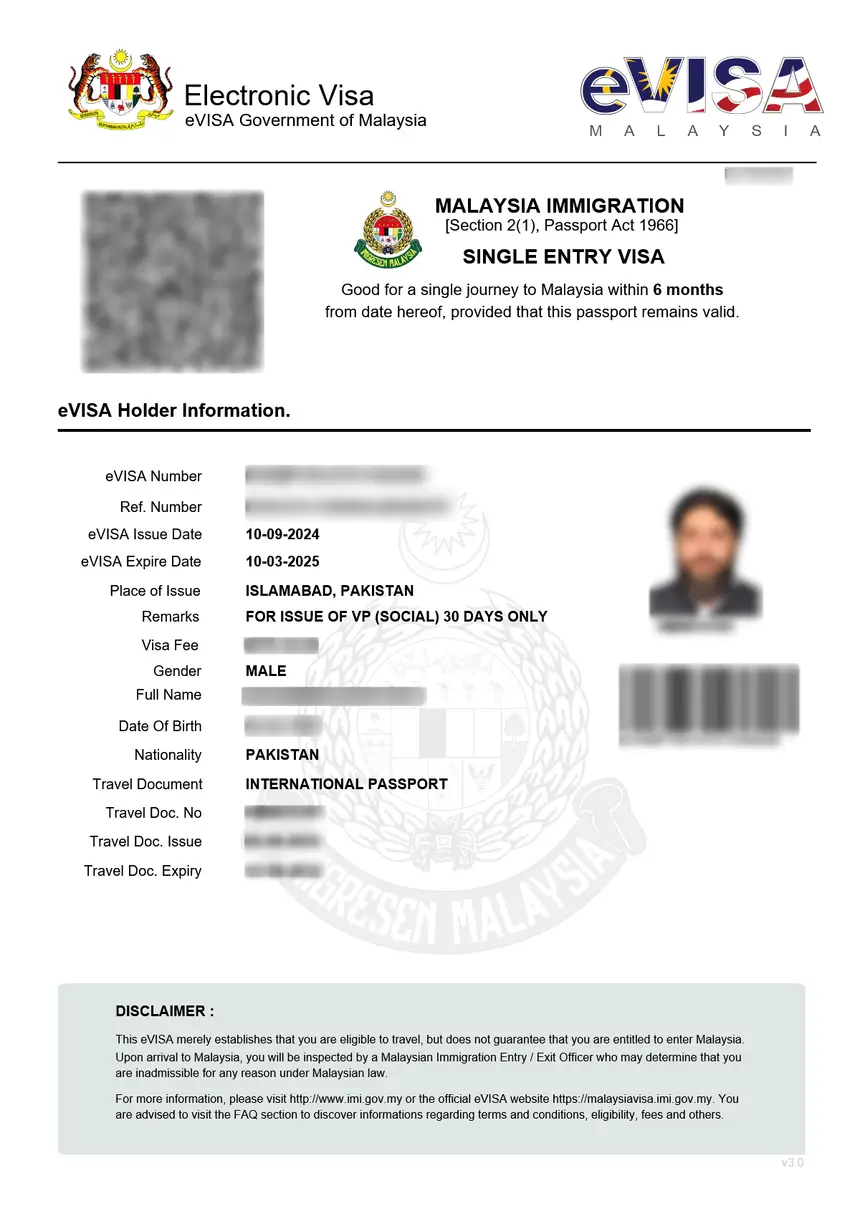
Your visa application has been accepted. You can download your eVisa from the MyVISA portal or from the link sent to your email. Print the eVisa and carry it with your passport when travelling to Malaysia.
Under Processing / Pending
Your application is still being reviewed by the immigration authorities. For eVisa applications, this typically lasts 1 to 3 business days. Do not submit a new application while your current one is being processed, as duplicate applications can cause confusion.
Rejected / Not Approved
Your visa application has been denied. Common reasons include incomplete documents, invalid passport photos, passport validity of less than 6 months from the travel date, or discrepancies in the information provided. You may reapply after addressing the issues that led to the rejection.
No Record Found
The system cannot locate your application using the details you entered. This does not necessarily mean your application was denied – see the troubleshooting section below.
Troubleshooting: Common Malaysia Visa Status Check Problems
Many applicants encounter technical issues when checking their Malaysia visa application status. Here are the most common problems and their solutions.
“No Record Found” Error
This is the most frequently reported issue. When the MyIMMs or MyVISA portal returns a “No Record Found” message, it typically means one of the following:
- Incorrect reference number – double-check the reference number from your confirmation email. The format is EV followed by numbers (e.g., EV000000R2). Make sure there are no extra spaces or missing characters
- Application not yet processed – if you just submitted your application, wait 24 to 48 hours before checking again. The system needs time to register new applications
- Wrong portal – eNTRI applications and eVisa applications may use different status check systems. Verify which portal matches your application type
- Country code mismatch – ensure you selected the correct country of passport issuance
If the error persists after verifying all details, contact the Immigration Department directly with your passport number and personal information to help locate your application.
Technical Website Issues
If the status check portal is loading slowly or showing errors:
- Clear your browser cache and cookies – old cached data can interfere with the portal
- Try a different browser – Chrome, Firefox, and Edge are recommended
- Disable VPN connections – some VPNs may be blocked by Malaysian government portals
- Try during off-peak hours – the portal may experience high traffic during business hours (Malaysian time, GMT+8)
Status Has Not Changed After Application Period
eVisa applications are usually processed within 2 to 3 business days. If your status has not changed after 5 business days, consider the following:
- Check if additional documents were requested via email
- Verify that your payment was successfully processed
- Contact the Immigration Department helpline or visit the nearest Malaysian embassy
For VFS Global applications, allow the full 3 to 4 weeks processing period before inquiring about delays.
Malaysia eVisa vs eNTRI: Which Status Check to Use
The method for checking your visa status depends on which type of Malaysia visa you applied for. The two main online visa systems – eVisa and eNTRI – have different application and tracking portals.
eVisa Status Check
The Malaysia eVisa is available to nationals of countries that require a visa to enter Malaysia. Applications are submitted through malaysiavisa.imi.gov.my and status can be checked on the same portal or through eservices.imi.gov.my. The eVisa is typically valid for 3 months with a stay period of up to 30 days.
eNTRI Status Check
The eNTRI (Electronic Travel Registration and Information) is a visa waiver facility available to nationals of specific countries including India and China. Applications are registered through the eNTRI system, and confirmation is usually issued within 24 hours. The eNTRI allows a stay of up to 15 days and is valid for 3 months from the date of issuance.
If you are unsure which type you applied for, check your confirmation email. eVisa reference numbers start with EV, while eNTRI reference numbers have a different prefix.
For a detailed comparison, see our guide on Malaysia eVISA vs eNTRI: Key Differences.
What to Do After Your Malaysia Visa Is Approved
Once your Malaysia visa application status shows “Approved”, take these steps before your trip:
Download and Print Your eVisa
- Log in to the MyVISA portal at malaysiavisa.imi.gov.my
- Navigate to your approved application
- Download the eVisa document as a PDF
- Print at least two copies – one for your carry-on and one as a backup
Prepare Your Travel Documents
Before departing for Malaysia, ensure you have the following ready:
- Valid passport with at least 6 months validity from your date of entry
- Printed eVisa or eNTRI confirmation
- Return or onward flight ticket
- Proof of accommodation (hotel booking or host address)
- Sufficient funds for your stay
Complete the Malaysia Digital Arrival Card (MDAC)
All foreign visitors must register the Malaysia Digital Arrival Card (MDAC) within 3 days before arriving in Malaysia. This is a separate requirement from your visa. Complete your MDAC registration at the official portal before your flight.
For full details, read our guide on How to Fill Malaysia Digital Arrival Card and check the MDAC Requirements.
Frequently Asked Questions
How long does it take to get Malaysia eVisa approved?
Most Malaysia eVisa applications are processed within 2 to 3 business days. During peak travel seasons or if additional documents are required, processing may take up to 5 business days. eNTRI registrations are typically confirmed within 24 hours.
Can I check my Malaysia visa status with just my passport number?
On the MyIMMs portal (eservices.imi.gov.my), you can search using your passport number along with your country code. However, using your reference number provides more accurate results. The EMGS student visa portal also allows passport-number-based tracking.
What does “No Record Found” mean when checking Malaysia visa status?
“No Record Found” means the system cannot locate an application with the details you entered. This usually happens due to an incorrect reference number, a recently submitted application that has not yet been registered in the system, or searching on the wrong portal for your visa type.
How do I check my Malaysia visa status from India?
Indian nationals can check their Malaysia visa status through the same portals as all other nationalities. Use eservices.imi.gov.my for eVisa status or the eNTRI portal if you applied for the visa waiver. Indian passport holders are currently exempt from visa requirements for social visits to Malaysia until 31 December 2026, so you may not need a visa at all for short stays.
Can I check my Malaysia visa status on my phone?
Yes, the MyIMMs and MyVISA portals are accessible through mobile browsers. There is also a MyVISA mobile app available for download that allows you to check your visa status and download your approved eVisa directly to your phone.
What should I do if my Malaysia visa application is rejected?
If your visa application is rejected, review the rejection reason provided in the status or email notification. Common fixes include uploading a clearer passport photo, ensuring your passport has at least 6 months validity, providing complete financial proof, or correcting information errors. You can submit a new application after addressing the issues. For more details, see our guide on Malaysia Visa Types.
Is there a fee to check Malaysia visa application status?
No, checking your Malaysia visa application status on the official government portals is completely free. The MyIMMs, MyVISA, and EMGS platforms do not charge any fee for status inquiries. Be cautious of third-party websites that may charge for status-check services.
How do I contact Malaysia immigration about my visa status?
You can contact the Immigration Department of Malaysia through their official website at imi.gov.my, visit the nearest Malaysian embassy or consulate, or call the immigration helpline. When contacting them, have your reference number, passport number, and full name ready.